Work with the assistant · Reviewed 24 October 2026
AI assistant, voice and follow-ups
Draft and edit invoices, start payment plans and ask about collections through text or supported voice controls.
Start with a concrete task
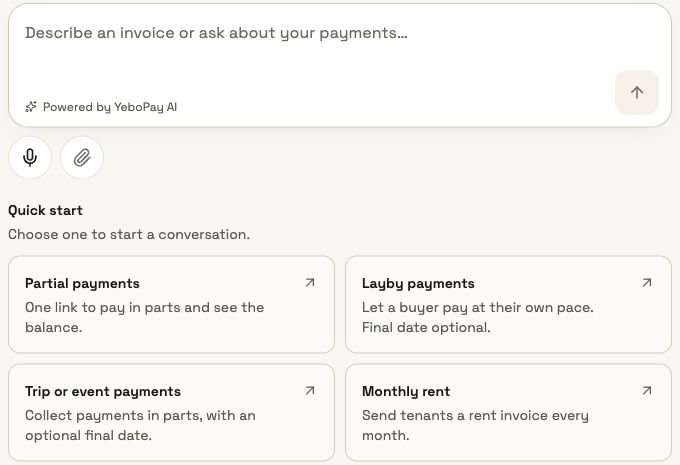
Open Assistant. Choose a Quick start example or describe the customer, purchase, amount and date. Examples include partial payments, layby, trips, monthly rent, school fees, memberships and unpaid invoices. Selecting an example prepares an editable prompt; review it before sending.
Review drafts and edits
Inspect the invoice preview before approving delivery. Check customer identity, line items, currency, tax, due date and whether partial payments are enabled. Edit the preview and wait for its save state; use the shown Retry action if a save fails. Return to chat when you want another change.
For overdue follow-ups, ask who owes money and inspect the invoices and proposed action. Reminder settings and due dates affect automated follow-ups; undated flexible invoices do not become overdue simply because time has passed. Proofs awaiting review require confirmation before normal chasing continues.
Use the available voice controls
The assistant offers a voice-note recorder, audio upload, Voice replies and Live voice where available. Use the microphone control for a note or open Live voice for a conversation. Browser permission and audio-device availability affect capture. Review the written amount, customer and invoice reference before any consequential action.
Select the supported language in the application where offered. Business names, amounts, currencies, references and customer-authored text should remain exact. If recognition, a tool request or playback fails, use the displayed error and retry controls.
Ask for a billing schedule
For rent or memberships, ask for recurring invoices and specify the frequency and first billing date. For school fees, ask for a fixed installment count and total. Review the complete schedule before confirming. A hotel-software example starts a discussion of integration requirements; it does not establish that a connector to that software exists.
See recurring billing and subscriptions for the difference between invoices, scheduled charges and flexible partial payments.
Explore the other features
Browse all guides
- Escrow holds, releases and disputes
- Invoices, partial payments and layby
- Customers, CSV imports and bulk billing
- Collection channels and bank accounts
- Bank proof review and issued receipts
- Payouts, withdrawals and partial settlements
- Recurring billing, installments and subscriptions
- API keys, hosted checkout and webhooks
- Business setup, verification and security