Protect a payment · Reviewed 24 October 2026
Escrow holds, releases and disputes
Create a funded hold, keep the buyer’s release code private, and track release, refund or dispute resolution.
Before you start
Open Escrow in the merchant dashboard. On a phone, use More → Escrow. You need an activated merchant, the buyer’s YeboID user ID, an amount and currency, and a wallet recipient or external bank destination.
Escrow uses live funds. There are no simulated escrow balances. Test view shows a prompt to switch to Live. Creating a hold can reserve wallet funds or initiate a real provider payment.
Create a hold
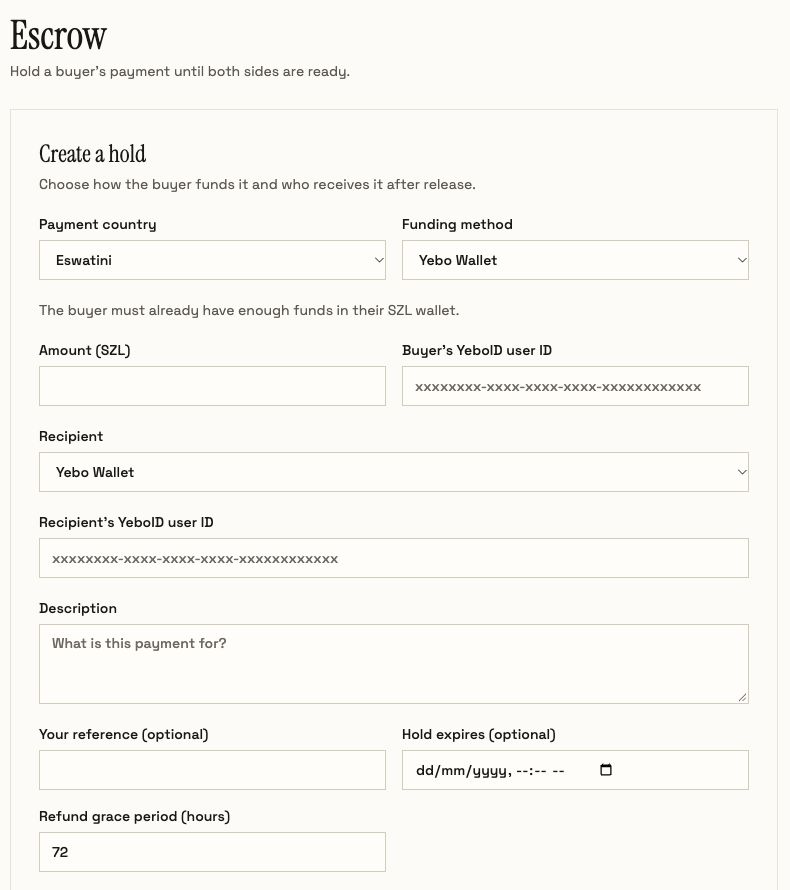
- Select Create hold. Choose Payment country, then an available Funding method. The options come from the payment service for that country; a listed country alone does not mean every provider is available.
- Enter Amount and Buyer’s YeboID user ID. Wallet funding requires enough available funds in the buyer’s matching-currency wallet. Provider funding can request a phone number or produce a hosted payment link.
- Choose Recipient. For Yebo Wallet, enter the recipient’s YeboID user ID. For an external bank account, complete the displayed destination fields and check them before submitting.
- Add a description, optional reference and optional expiry. Review Refund grace period (hours); the form initially shows 72 hours.
- Review and submit Create hold only when ready to initiate the live operation. Save the returned release code privately and give it to the buyer.
Confirm the funding result
Wallet funding can create the hold immediately. A provider payment can first appear under Funding payments. Give the buyer the payment link if one is returned. A pending funding request is not a funded hold. Refresh until the hold appears as Held, or inspect the displayed failure or expiry.
The code is displayed on creation or replacement and cannot be read back later. If it is lost, open a funded hold and use Generate new code; share the replacement privately. This invalidates the old code.
Release or refund
- Open the hold and verify amount, recipient, reference and current status.
- For a release, select Release funds, obtain the buyer’s six-digit code, and enter it. For a refund, select Refund buyer and enter a reason.
- Review the action, tick the confirmation checkbox and submit. Inspect the refreshed status before repeating an action.
Refunds return funds to the buyer’s Yebo Wallet. They do not reverse the original card or mobile-money charge. A release to an external recipient creates a pending payout request; operations must confirm the bank payment separately.
Understand each state
| Dashboard | API status | Meaning / next action |
|---|---|---|
| Held | FROZEN | Funds are reserved. Release, refund, dispute or replace the code as appropriate. |
| Refund pending | PENDING_REFUND | Expiry has started the refund grace period. Inspect the refund-eligible date. |
| Disputed | DISPUTED | Normal release and automatic refunds are paused. Resolve the dispute. |
| Released | RELEASED | The hold is released. External bank payment still has its own confirmation. |
| Refunded | REFUNDED | The held funds have returned to the buyer’s wallet. |
For a disputed hold, select Resolve dispute, choose release or refund, and confirm the decision. This resolution does not require the buyer’s code. Repeated incorrect release codes can lock release; generate a replacement rather than guessing.
Integrate escrow through the API
Use a server API key with escrow.read for reads and escrow.write for changes. Escrow mutations reject test keys. Keep a stable Idempotency-Key per creation attempt and unchanged body when retrying.
| Operation | Endpoint |
|---|---|
| Discover escrow-capable funding | GET /v1/escrow/funding-options?country=SZ |
| Check funding queue | GET /v1/escrow/funding |
| Create / list holds | POST /v1/escrow · GET /v1/escrow |
| Inspect a hold | GET /v1/escrow/{id} |
| Perform an action | POST /v1/escrow/{id}/release, /refund, /dispute, /resolve, /rotate-code |
Create with explicit source (wallet, charge or checkout), positive amount, currency, buyer_yeboid_sub and recipient. A wallet recipient is {"type":"wallet","yeboid_sub":"CUSTOMER_UUID"}. Provider funding additionally needs country and a discovered provider_code; supply any provider-required phone. External recipients use type: "external" and a non-empty payout_details object.
HTTP 202 with pending: true means funding is in progress. HTTP 201 returns a created hold; an idempotent replay can return 200 without the original plaintext code. Release takes {"code":"SIX_DIGITS"}; dispute/refund take a reason; resolution takes {"action":"release"} or {"action":"refund"}. Never log or publish release codes.
Handle signed escrow.held, escrow.released, escrow.refunded and escrow.disputed events. After a timeout, retrieve current state or retry the original creation attempt; do not assume failure means no money moved.
Explore the other features
Browse all guides
- Invoices, partial payments and layby
- Customers, CSV imports and bulk billing
- Collection channels and bank accounts
- Bank proof review and issued receipts
- Payouts, withdrawals and partial settlements
- AI assistant, voice and follow-ups
- Recurring billing, installments and subscriptions
- API keys, hosted checkout and webhooks
- Business setup, verification and security